I'd just like to thank everyone that has purchased our assets over the last year and supported us. Over 2013 we will be improving our current assets to provide the best possible experience from them and to better support you, the developers.
Happy New Years and the best of wishes to you.
Regards,
Garth

Monday, 31 December 2012

Thursday, 22 November 2012
Spawner - Pro - Tutorial 1

Here's a simple tutorial going through setting up a Spawner and enemy units.
Apologies for the visual artifacts, it seems to be an issue with my recording software.
Regards,
Garth
Spawner - Pro Released
Over the past few weeks I have put some work into our Spawner system to get an upgraded version with more features to be released as a Pro version. This has been uploaded to Unity's Asset Store and is awaiting review.
Some of the new features include:
- A new custom Inspector and Editors
- Multiple Spawn Locations per a Spawner
- Multiple Units per a Unit Level
- Coded to work with Unity 4
- Lots of coding changes to try and improve performance
 |
| Inspector |
 |
| Unit Editor |
 |
| Wave Editor |
Source Code: C#
Price: $20
Asset Store Link
Webplayer
I hope to have a tutorial up soon. Was hoping to have one done today but ran into issues with the internet.
Regards,
Garth
Thursday, 13 September 2012
Localising: V3.0 Coming

There is a massive amount of breaking changes in this version however, there are lots of awesome changes that will make future improvements easier and better. There is a new file format, so upgrades will take some time to convert them to the new format by hand.
Changes:
- Changed the system to use CSV files instead of Key:Value
- Changed the method of handling multiple languages. That is now stored in the CSV files
- Made Localisation into a MonoBehaviour
- Made a custom inspector for Localisation
- Improved the editor for localised files
- Added a search option for identities to the editor
- Added a language filter option to the editor
- Now uses Unity 3.5.5 (will probably backport it within the next while)
- Price change to $25
 |
| Registering a Save Method |
 |
| Save Method |
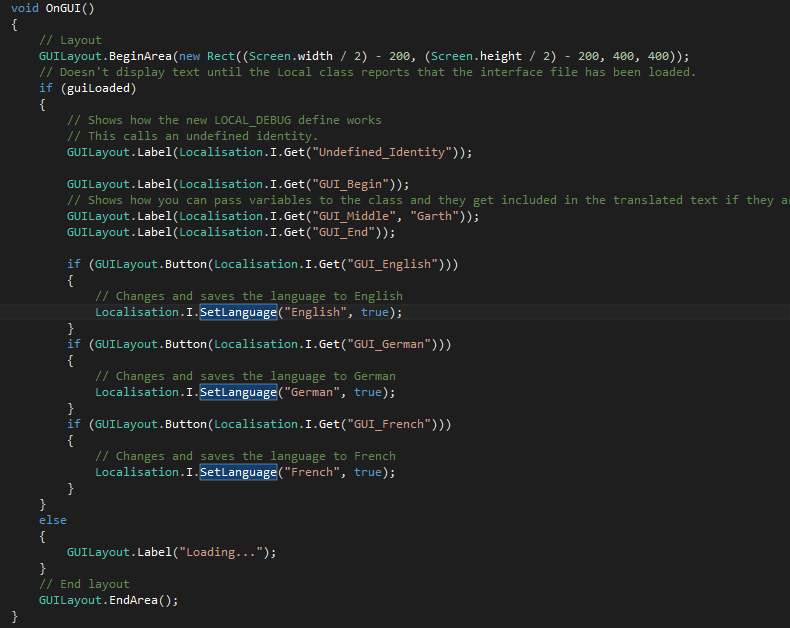 |
| OnGUI Method |
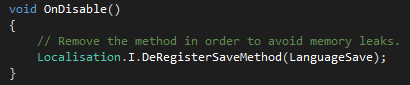 |
| DeRegistering the Save Method |
 |
| Editor - No Open File |
 |
| Editor - Open File |
 |
| Editor - Filtering Languages |
 |
| Editor - Searching Identities |
 |
| Customer Inspector |
WebPlayer Demo
Regards,
Garth
Wednesday, 12 September 2012
UniPack: 1.0 Released

Also supported is creating patch files. This takes the latest version of a folder and compares it to a older packed file, it then generates a patch file that can be distributed in a patch to your game. This means you won't have to redistribute the whole file when making incremental patches.
Name: UniPack
Source Code: C#
Price: $ 30
Unity Version: 3.4.1
Works with Unity Free
Asset Store Link.
Documentation
*Only been tested on a Windows 7 (x64) machine.

Regards,
Garth (Lead)
Wednesday, 5 September 2012
Online Documentation
I've placed all documentation for our current projects online.
Spawner
MessageBox
Localising
JukeBox - Pro
INISystem
GameAds
FeedMe
Console
UniPack is still being worked on but is approaching 1.0 release level.
Regards,
Garth
Spawner
MessageBox
Localising
JukeBox - Pro
INISystem
GameAds
FeedMe
Console
UniPack is still being worked on but is approaching 1.0 release level.
Regards,
Garth
Friday, 3 August 2012
Introducing: UniPack
With university having started again recently I have had less time to dedicate to upgrading and working on the various projects that we offer. However, every now and then I get time to work on something and usually it results in something beneficial.
Lately I have been dedicating most of my free time to getting a .pak reader/writer up and running within Unity. Having struggled to find information about the structure and so forth of a .pak file I eventually came across some resources which helped me with the reader and writer part.
I expanded the code to be able to accept either a folder or a packed file. This makes it easier to develop with, since you won't be needing to repack the folder every time you make a change to a file within it.
I am currently in the final bug squashing and document writing stages of a first release. This can take up to three weeks to be completed but hopefully it will be out the door before then.
Regards,
Garth
Lately I have been dedicating most of my free time to getting a .pak reader/writer up and running within Unity. Having struggled to find information about the structure and so forth of a .pak file I eventually came across some resources which helped me with the reader and writer part.
I expanded the code to be able to accept either a folder or a packed file. This makes it easier to develop with, since you won't be needing to repack the folder every time you make a change to a file within it.
I am currently in the final bug squashing and document writing stages of a first release. This can take up to three weeks to be completed but hopefully it will be out the door before then.
Regards,
Garth
Wednesday, 23 May 2012
Localising Version 3.0 Coming Soon
Lately I have been working on the next version for Localisating, our localisation library for Unity. The new version should be easier to use and still provide the same functionality at its core. There are various small improvements to be done before release but you can expect it to be released shortly.
This update will be a free update to previous purchasers of Localising. Once it is closer to release I will write an update guide and a tutorial for using Localising within your Unity application.
Regards,
Garth
Wednesday, 18 April 2012
INISystem: Updated Tutorial

So with the 2.0 release of INISystem there comes a bunch of breaking changes code side. So this is an updated tutorial showing some basic usage.
Loading an .ini file called config, that doesn't require Unity specific DataTypes.
INIContent config;
try
{
 config = INIFile.Read("config.ini"); // Reads the file from disk.
}
catch (System.IO.FileNotFoundException ex)// INIFile.Read throws a FileNotFound exception when the file doesn't exist.
{
 // You can now place any handling of that, such as creating an INI file.
 config = new INIContent();
 INIFile.Write(ex.FileName, config);
}
Loading an .ini file called config, that requires Unity specific DataTypes (e.g. Color, Vector2)
INIUnity unityConfig;
try
{
 config = INIFile.Read("config.ini").ToINIUnity(); // Reads the file from disk.
}
catch (System.IO.FileNotFoundException ex)// INIFile.Read throws a FileNotFound exception when the file doesn't exist.
{
 // You can now place any handling of that, such as creating an INI file.
 config = new INIUnity();
 INIFile.Write(ex.FileName, config);
}
To get an entry from the INI file it is as simple as it was before, even simpler when using Unity DataTypes. (The following assumes you have loaded an INI file by the previous method for Unity Specific.
// To load a string
string text = config.GetString("text", "General", "Default text, if no text is found");
// To load an integer
int number = config.GetInt("number", "General", );
// To load a Unity specific DataType (Color)
Color hudColor = config.GetColor("HUDColor", "General", Color.White);
// To load a Unity specific DataType (Vector2)
Vector2 menuLocation = config.GetVector2("menuLocation", "General", new Vector2(10,10));
The following is used to change an INI entry. (Assumes that the second loading method was used to set up a config object of type INIUnity)
// Changing a string value
config.Change("text", "New text that will now be loaded", "General");
// Changing a integer value
config.Change("number", 5, "General");
// Changing a Unity specific DataType (Color)
config.Change("hudColor", Color.Green, "General");
// Changing a Unity specific DataType (Vector2)
config.Change("menuLocation", new Vector2(50,180), "General");
Finally to save the changes back to file, it is fairly simple. (The following assumes that you have followed the previous example and made changes to the config)
// Saves the changes to file.
if (INIFile.Write("config.ini", (INIContent)config))
 Debug.Log("File saved successfully!");
else
 Debug.Log("Error encountered while trying to save config file");
I hope this tutorial has enlightened you to the changes in version 2.0. You can purchase INISystem from Unity's Asset Store at: http://u3d.as/content/corrupted-smile-studio/inisystemRegards, Garth
Update
I apologise for the lack of updates over the last couple of weeks. I have been busy with university which sucks up a lot of my time and energy. However, there is some good news hidden somewhere.
I have released updates to both INISystem and JukeBox Pro, so check them out on Unity's Asset Store. I will be doing an update to the previous INISystem tutorial as a lot has changed since version 1.1.
I also took some time to look at Canyon Project again my on and off game project for the last year or so. I have been playing around with trying to get that optimised so that it can run on a PC that isn't a quad core. So I got to focus some time on that.
I shall be seeing you guys around soon,
Garth
I have released updates to both INISystem and JukeBox Pro, so check them out on Unity's Asset Store. I will be doing an update to the previous INISystem tutorial as a lot has changed since version 1.1.
I also took some time to look at Canyon Project again my on and off game project for the last year or so. I have been playing around with trying to get that optimised so that it can run on a PC that isn't a quad core. So I got to focus some time on that.
I shall be seeing you guys around soon,
Garth
Subscribe to:
Comments (Atom)