Showing posts with label C#. Show all posts

Thursday, 22 November 2012

Spawner - Pro - Tutorial 1


Here's a simple tutorial going through setting up a Spawner and enemy units.
Apologies for the visual artifacts, it seems to be an issue with my recording software.


Regards,
Garth

Spawner - Pro Released


Over the past few weeks I have put some work into our Spawner system to get an upgraded version with more features to be released as a Pro version. This has been uploaded to Unity's Asset Store and is awaiting review.

Some of the new features include:

  • A new custom Inspector and Editors
  • Multiple Spawn Locations per a Spawner
  • Multiple Units per a Unit Level
  • Coded to work with Unity 4
  • Lots of coding changes to try and improve performance
Inspector

Unit Editor

Wave Editor
Documentation
Source Code: C#
Price: $20
Asset Store Link
Webplayer

I hope to have a tutorial up soon. Was hoping to have one done today but ran into issues with the internet.

Regards,
Garth

Thursday, 13 September 2012

Localising: V3.0 Coming

Version 3.0 of Localising is now waiting for Unity to approve it on the Asset Store. (edit: is now live)

There is a massive amount of breaking changes in this version however, there are lots of awesome changes that will make future improvements easier and better. There is a new file format, so upgrades will take some time to convert them to the new format by hand.

Changes:
  • Changed the system to use CSV files instead of Key:Value
  • Changed the method of handling multiple languages. That is now stored in the CSV files
  • Made Localisation into a MonoBehaviour
  • Made a custom inspector for Localisation
  • Improved the editor for localised files
  • Added a search option for identities to the editor
  • Added a language filter option to the editor
  • Now uses Unity 3.5.5 (will probably backport it within the next while)
  • Price change to $25
Registering a Save Method
Save Method
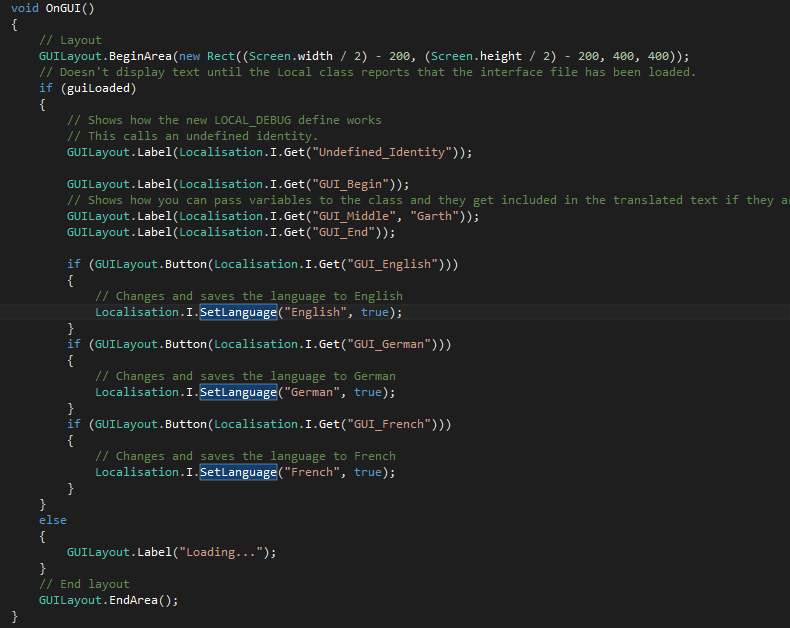
OnGUI Method
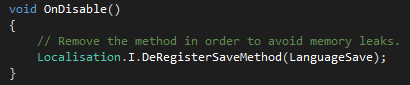
DeRegistering the Save Method
Editor - No Open File
Editor - Open File
Editor - Filtering Languages
Editor - Searching Identities
Customer Inspector

Documentation
WebPlayer Demo

Regards,
Garth

Wednesday, 12 September 2012

UniPack: 1.0 Released


UniPack is a simple to use file compactor, similar to .PAK and .TAR. It will create a single file from a folder full of files. This makes it easier to distribute game content and updates. UniPack also supports viewing of standard folders as if they were packed files. This means that you won't have to constantly recreate the packed file when you make changes during development.

Also supported is creating patch files. This takes the latest version of a folder and compares it to a older packed file, it then generates a patch file that can be distributed in a patch to your game. This means you won't have to redistribute the whole file when making incremental patches.

Name: UniPack
Source Code: C#
Price: $ 30
Unity Version: 3.4.1
Works with Unity Free
Asset Store Link.
Documentation
*Only been tested on a Windows 7 (x64) machine.


Regards,
Garth (Lead)

Friday, 3 August 2012

Introducing: UniPack

With university having started again recently I have had less time to dedicate to upgrading and working on the various projects that we offer. However, every now and then I get time to work on something and usually it results in something beneficial.

Lately I have been dedicating most of my free time to getting a .pak reader/writer up and running within Unity. Having struggled to find information about the structure and so forth of a .pak file I eventually came across some resources which helped me with the reader and writer part.

I expanded the code to be able to accept either a folder or a packed file. This makes it easier to develop with, since you won't be needing to repack the folder every time you make a change to a file within it.

I am currently in the final bug squashing and document writing stages of a first release. This can take up to three weeks to be completed but hopefully it will be out the door before then.

Regards,
Garth

Wednesday, 23 May 2012

Localising Version 3.0 Coming Soon


Lately I have been working on the next version for Localisating, our localisation library for Unity. The new version should be easier to use and still provide the same functionality at its core. There are various small improvements to be done before release but you can expect it to be released shortly.

This update will be a free update to previous purchasers of Localising. Once it is closer to release I will write an update guide and a tutorial for using Localising within your Unity application.

Regards,
Garth

Wednesday, 18 April 2012

INISystem: Updated Tutorial


So with the 2.0 release of INISystem there comes a bunch of breaking changes code side. So this is an updated tutorial showing some basic usage.

Loading an .ini file called config, that doesn't require Unity specific DataTypes.
INIContent config;
try
{
 config = INIFile.Read("config.ini"); // Reads the file from disk.
}
catch (System.IO.FileNotFoundException ex)// INIFile.Read throws a FileNotFound exception when the file doesn't exist.
{
 // You can now place any handling of that, such as creating an INI file.
 config = new INIContent();
 INIFile.Write(ex.FileName, config);
}
Loading an .ini file called config, that requires Unity specific DataTypes (e.g. Color, Vector2)
INIUnity unityConfig;
try
{
 config = INIFile.Read("config.ini").ToINIUnity(); // Reads the file from disk.
}
catch (System.IO.FileNotFoundException ex)// INIFile.Read throws a FileNotFound exception when the file doesn't exist.
{
 // You can now place any handling of that, such as creating an INI file.
 config = new INIUnity();
 INIFile.Write(ex.FileName, config);
}
To get an entry from the INI file it is as simple as it was before, even simpler when using Unity DataTypes. (The following assumes you have loaded an INI file by the previous method for Unity Specific.
// To load a string
string text = config.GetString("text", "General", "Default text, if no text is found");
// To load an integer
int number = config.GetInt("number", "General", );
// To load a Unity specific DataType (Color)
Color hudColor = config.GetColor("HUDColor", "General", Color.White);
// To load a Unity specific DataType (Vector2)
Vector2 menuLocation = config.GetVector2("menuLocation", "General", new Vector2(10,10));
The following is used to change an INI entry. (Assumes that the second loading method was used to set up a config object of type INIUnity)
// Changing a string value
config.Change("text", "New text that will now be loaded", "General");
// Changing a integer value
config.Change("number", 5, "General");
// Changing a Unity specific DataType (Color)
config.Change("hudColor", Color.Green, "General");
// Changing a Unity specific DataType (Vector2)
config.Change("menuLocation", new Vector2(50,180), "General");
Finally to save the changes back to file, it is fairly simple. (The following assumes that you have followed the previous example and made changes to the config)
// Saves the changes to file.
if (INIFile.Write("config.ini", (INIContent)config))
 Debug.Log("File saved successfully!");
else
 Debug.Log("Error encountered while trying to save config file");
I hope this tutorial has enlightened you to the changes in version 2.0. You can purchase INISystem from Unity's Asset Store at: http://u3d.as/content/corrupted-smile-studio/inisystem

Regards, Garth

Friday, 17 February 2012

JukeBox - Pro Version 1.5

Version 1.5 of Jukebox Pro has been approved and is now available on the Asset Store.

This version is the biggest update that we have done for JukeBox and makes the differences between the Pro and Free version more noticeable. I will shortly update the free version with some of the features of the new features.

New Features:
  • Multiple playlists
  • User loaded songs get loaded into a User playlist
  • Many small bug fixes and updates
  • Improved inspector to handle the new features
  • An improved example of the system in the form of a Music Player
  • Updated to use events instead of callbacks, which are very similar. This allows multiple scripts to hook into the jukebox to get song changes.
  • Seek through songs is now possible
  • Pausing is now possible too
  • Price is now $5
New Inspector
Regards,
Garth

Monday, 6 February 2012

.NET Message Boxes in Unity

While browsing the answer.unity3d.com site I came across a question on how to make a message box in Unity, so I set about recreating as much of the message box functionality as possible in Unity's standard GUI system. Having just implemented a very similar system in order to display Debug messages to the screen it proved rather simple.

Without further ado I present to you MessageBox, a Unity MessageBox implementation of the .NET MessageBox. Complete with selectable buttons and icons. It uses Callbacks instead of the inline way that the .NET version does, however it is similar in every other way.


Runtime
Supports almost every overloaded method of MessageBox.Show(), it does not support any of the IWin32Window or Help methods.

.NET Example:
var result = MessageBox.Show("This is the text", "This is the Title", MessageBoxButtons.YesNo);
if(result == DialogResult.Yes)
{
   Console.Write("Yes");
}
else
{
   Console.Write("No");
}

Unity Example:
void Start()
{
   MessageBox.Show(HandleMessage,"This is the text", "This is the Title", MessageBoxButtons.YesNo);
}

void HandleMessage(DialogResult result)
{
   if(result == DialogResult.Yes)
   {
      Console.Write("Yes");
   }
   else
   {
      Console.Write("No");
   }
}
Which is very similar with the only change being the callback in the beginning (HandleMessage) which can be any method as long as it accepts a DialogResult parameter.

Version: 1.0
Unity Version: 3.4.1 Free
Price: $2
Asset Store Link: http://u3d.as/content/corrupted-smile-studio/message-box/2Eo
Web Player Demo.

Regards,
Garth

Spawner - Roadmap

Over the past couple of days I have focused quite a bit of my time into updating Spawner after Path-o-Logical's Rafes suggested I look into providing support for their Pool Manager system. After receiving a copy of Pool Manager to aid with testing the system I set about coding in support for Pool Manager while still allowing those without the system to still be able to use the system. This turned out to not be too difficult to implement and was pretty straight forward with some minor changes to existing code in order for everything to work smoothly together.

I pushed that version (1.5) to the Asset Store on Saturday (4th Feb) and it is still currently awaiting review. Sunday (5th Feb) I woke up and decided to work on a new update that changes the way the main Spawner class handles the spawning. It currently uses Update() which is inefficient for what the system does, so I set about changing it to a coroutine with a small amount of seemingly strange errors I got it working correctly with all the Spawn Modes.

So, I am currently waiting for version 1.5 to be approved on the Asset Store and then I am going to upload version 1.6 which also happens to include improved documentation which could be found on Docs.zip. This contains some better descriptions of classes and a installation guide and so on.

So to sum it all up, it looks like there is going to be a whole bunch of performance improvements coming to Spawner in the coming week and all of this for free. If you use Spawner and like it, if you would consider purchasing one of my other assets that would be awesome.

Regards,
Garth

Thursday, 26 January 2012

JukeBox - Pro, V1.0 Ready for Release


I've put my head down and put some effort into polishing JukeBox Pro, so that I may get it into your hands as soon as possible. This is just an initial release with some pro features, if you can think of more features that would be cool to have let me know and I will do my best to include them in future releases.

The current feature set is:

  • Custom Dynamic Inspector (based on what you doing)
  • Runtime file loading for user music.
  • Written to support both desktop and phones, loads .ogg/.mp3 depending on the platform.
  • File loading is disabled on consoles.
  • Many small bug fixes and possible speed improvements made
  • All JukeBox Free features are available.
Version: 1.0
Source Code: C#
Unity Version: 3.4.1 Free
Price: $10

Custom Inspector
Regards,
Garth

Spawner - Available on Unity's Asset Store

Spawner is now available on Unity's Asset Store, it's free, so there's no reason not to buy it.
http://u3d.as/content/corrupted-smile-studio/spawner-free/2C3

Regards,
Garth

Monday, 28 November 2011

INISystem Update 1.11 - Bug Fix


I decided to push the bug fix release of INISystem before the new release has even been approved. This version has a couple breaking features in it.

Such as the classes are no longer under the CSS namespace instead they are under CorruptedSmileStudio.INI namespace. This change was made to ensure that there should never be any clashes with other classes with similar names. The main class is also compiled as a DLL, this is just to ensure if there are any bugs that get reported I will know that it is not as a result of my code being changed. The INIHelper class however is not in the DLL but free, this allows a programmer to add their own parsers to the class as they see fit.

I hope this won't cause too much disruption and updating your code to reflect these changes shouldn't take longer than 5 minutes or less.

Regards,
Garth (Lead)